
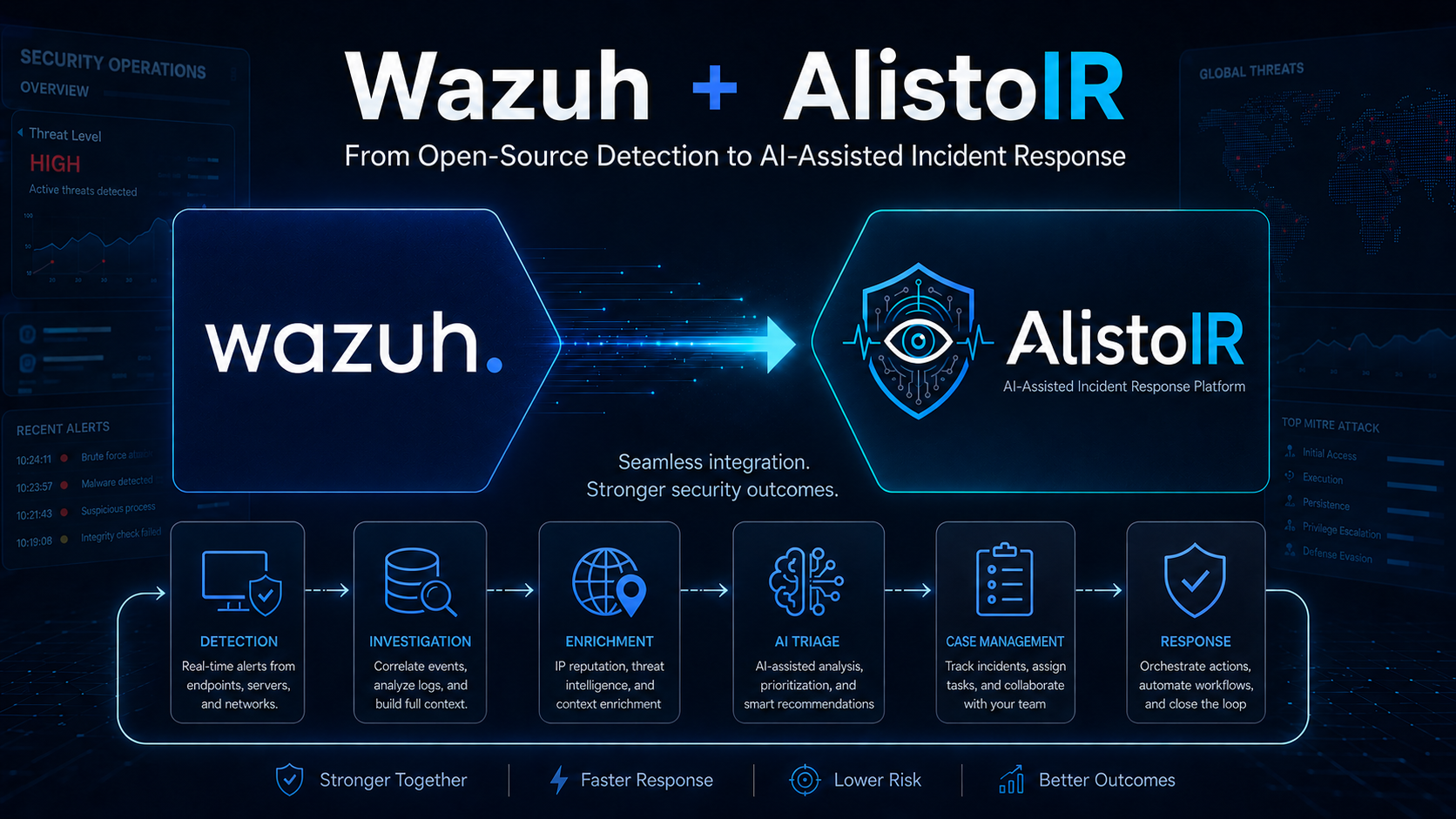
Wazuh + AlistoIR Integration Series Part 1: From Detection to AI-Assisted Incident Response
Security teams today are dealing with more alerts, more endpoints, more logs, and more pressure to respond quickly. A SIEM or XDR platform can detect suspicious activity, but detection is only the beginning of the investigation.
This is where the combination of Wazuh and AlistoIR becomes powerful.
Wazuh provides open-source security monitoring, log analysis, endpoint visibility, vulnerability detection, threat detection, and compliance capabilities. AlistoIR complements this by helping analysts investigate, enrich, document, and respond to alerts in a more structured and efficient way.
Together, they create a practical workflow for security operations: detect with Wazuh, investigate with AlistoIR, and respond with better context.
Note: This article is Part 1 of a Wazuh + AlistoIR integration series. This first post focuses on the concept, the SOC workflow, and the investigative value of the integration. A follow-up article will provide the step-by-step technical setup and validation of the working Wazuh + AlistoIR integration.
What is Wazuh?
Wazuh is an open-source security platform that provides SIEM and XDR capabilities. It helps organizations monitor endpoints, servers, cloud workloads, applications, and network devices.
With Wazuh, security teams can collect and analyze logs from different sources, detect suspicious behavior, monitor file integrity, identify vulnerabilities, review security configurations, and support compliance requirements.
Common Wazuh use cases include:
- Endpoint security monitoring
- Log analysis and correlation
- File Integrity Monitoring
- Vulnerability Detection
- Security Configuration Assessment
- Threat detection and alerting
- Threat hunting
- Incident response
- Compliance monitoring
- Cloud and container security monitoring
For many organizations, Wazuh is a strong foundation for building a cost-effective Security Operations Center because it provides visibility, detection, and alerting without requiring expensive commercial SIEM licensing.
Where AlistoIR Fits in the SOC Workflow
Detection is only the first step. After a Wazuh alert fires, analysts still need to answer investigation questions before they can make a sound decision.
For example, an analyst may need to determine:
- What happened, and how serious is it?
- Which host, user, or service was affected?
- When did it happen?
- What source and destination indicators are involved?
- Does the IP, domain, URL, or hash already have threat intelligence
context?
- What endpoint was involved?
- Are there related alerts, duplicate events, or similar past cases?
- Is the affected asset high criticality or business sensitive
- What happened before and after the alert?
- Does the alert belong in an existing case or a new investigation?
- Is containment needed, and if so, what action should be approved?
This is the gap AlistoIR is built to close. It provides the analyst with a structured investigation workspace rather than leaving the alert as an isolated detection event.
What is AlistoIR?
AlistoIR is an AI-assisted incident response and SOC investigation platform. The platform is designed to receive alerts, help analysts triage them, enrich observables, manage cases, preserve evidence, support collaboration, and document actions through resolution.
Instead of treating one alert as the entire incident, AlistoIR helps analysts build an investigation around the alert by organizing key details such as:
- Readable and raw alert telemetry
- Source and destination indicators
- Domains, URLs, file hashes, and other observables
- Affected users, endpoints, and Wazuh agent context
- MITRE ATT&CK techniques from linked alerts
- Threat intelligence and enrichment results
- Case notes, comments, and investigation tasks
- Evidence files and reportable case history
<!-- -->
- Recommended or approved response actions
The goal of AlistoIR is simple: help analysts investigate faster, document better, and respond with higher confidence.
What AlistoIR Currently Adds to Wazuh Investigations
1. Structured Alert Triage
When a Wazuh alert is forwarded to AlistoIR, the platform stores the full alert, normalizes key fields, preserves the raw JSON, and queues downstream processing, such as artifact extraction, enrichment, risk scoring, playbook triggers, and notifications.
From the alert view, analysts can review readable JSON, raw JSON, AI Insight, IOC matches, notes, status history, and case-linking actions. This is more accurate than describing the integration as only creating an incident record, because the current workflow begins with structured alert triage and then moves into analyst-driven escalation when needed.
2. Artifact Extraction and Threat Intelligence
AlistoIR automatically works with observables extracted from alerts and cases. Analysts can review or enrich IPs, domains, URLs, hashes, and email-style artifacts within the platform, rather than manually pivoting between tools.
Current enrichment sources documented in the platform include:
- VirusTotal
- AbuseIPDB
- AlienVault OTX
- MISP
- AI enrichment as supporting context
The current artifact workflow is especially useful because AlistoIR separates source scores from the final platform risk level. That helps analysts avoid overcalling a weak single-source hit malicious while still surfacing suspicious indicators that warrant investigation.
3. AI-Assisted Investigation With Analyst Control
AlistoIR includes AI Insight on alert pages, investigation chatbot flows for alerts and cases, and an AI hunt assistant. These features help analysts summarize an alert, interpret likely meaning, suggest next steps, and search for similar activity.
Just as importantly, the current platform keeps analysts in control. AI is positioned as decision support, not automated truth. The hardened workflow includes prompt-injection screening, sanitization, lightweight redaction, and safer output handling, while dismissal and escalation decisions still remain analyst-led by default.
4. Case-Centered Investigation
When an alert requires deeper work, analysts can link it to an existing case or create a new case directly from the alert. The case view then becomes the shared investigation record for the incident.
Current case capabilities include:
- Linked alerts and alert rollup
- Analyst comments and investigation tasks
- Evidence upload and evidence preview
- MITRE ATT&CK technique rollup
- Suggested matching alerts based on duplicate fingerprinting
- Related and similar cases
- Verdict support and case readiness indicators
- PDF case report generation with audit logging
5. Hunt, Correlation, and Pivoting
AlistoIR also provides the SOC with a dedicated hunting surface, enabling analysts to move beyond a single alert. The current Advanced Hunt Builder supports quick search, manual expressions, a visual rule builder, date filtering, saved hunt queries, CSV export, and AI-assisted hunt guidance.
This makes Wazuh alerts more valuable in practice because an analyst can pivot on source IP, destination IP, host, username, process, file hash, event ID, or raw JSON patterns and then test whether the activity is isolated or part of something broader.
6. CMDB and Business Context
AlistoIR can match alerts and cases to CMDB asset data using fields such as Wazuh agent ID, hostname, FQDN, MAC address, and IP history. This gives the analyst more than just technical telemetry.
When CMDB data is present, the investigation can include:
- Asset owner and business unit
- Criticality and exposure
- Data classification and environment
- Previous related cases and historic IP context
- Business impact guidance for prioritization
That context is especially important for SOC decision-making because the same Wazuh rule can mean very different things on a lab workstation, a production domain controller, or a sensitive HR asset.
7. Response Playbooks and Wazuh Active Response
AlistoIR is not only for documenting the investigation after the fact. The platform also includes playbooks that can update alert status, create cases, add comments, add artifacts, send notifications, and trigger Wazuh Active Response steps.
Current response-oriented actions include support for:
- Blocking attacker IPs through Wazuh Active Response
- Isolating a host through a Wazuh custom Active Response command
- Releasing host isolation after remediation
- Manager or admin approval queues for destructive actions
That means the integration is not limited to forwarding detections. It can also support controlled containment workflows once the analyst or approver has enough confidence to act.
8. Reporting, Audit Trail, and Collaboration
A mature SOC investigation needs defensible documentation. AlistoIR supports that with case reports, report downloads, audit logging, threaded comments, direct analyst chat, mentions, and notification integrations such as email and Slack.
This is an important operational advantage because the investigation record is not scattered across screenshots, chat fragments, and analyst memory. It is kept inside the platform as a structured case history, evidence, and report output.
Example Use Case: Brute Force Followed by Successful Login
Imagine Wazuh detects repeated failed logins from a single IP address, followed by a successful login shortly afterward. Wazuh can detect the pattern, but the analyst still has to determine whether the activity is a nuisance, an exposed service, or an active compromise.
With the current Wazuh and AlistoIR workflow, the analyst can:
- Review the forwarded alert in readable and raw form
- Check AI Insight for a quick summary and suggested next steps
- Enrich the source IP and review its reputation
- Pivot on the host, user, and source IP in Threat Hunting
- Review related alerts or similar past cases
- Escalate to a case and document findings, evidence, and tasks
- Use an approved playbook to block the source IP if containment is
justified
This turns a login alert into a documented, evidence-based investigation rather than a one-line triage note.
Example Use Case: Suspicious File Hash Detection
Wazuh may detect a suspicious file, script, or malware-related artifact on an endpoint. The alert can include the file path, file hash, endpoint name, and related rule data, but an analyst still needs to decide what the file means in context.
In AlistoIR, the analyst can review the extracted hash as an artifact, enrich it with supported intelligence sources, compare source scores with the final risk label, and then document whether the file is malicious, suspicious, unknown, or likely benign.
The case record can then include:
- The original Wazuh alert details
- The file path, hash, and affected host
- Supporting enrichment results
- Related alerts or similar cases
- Evidence files such as screenshots or exported logs
- Containment and remediation decisions
This creates a clearer and more defensible malware-investigation trail than treating the alert as only a detection event.
Example Use Case: Suspicious IP With Cross-Alert Correlation
Wazuh may also flag outbound traffic, authentication attempts, or command execution tied to a suspicious IP address. In that situation, the key question is often whether the IP appears in other activities across the environment.
AlistoIR helps the analyst investigate that by combining:
- IP enrichment and abuse context
- Geolocation and related network details were available
- Hunt pivots across alerts already ingested into the platform
- Case correlation and linked artifact history
- Asset and owner context for the affected host
- Containment options such as IP blocking or host isolation
That investigation path is much closer to actual SOC work than an immediate block-only narrative, because it preserves the analyst's ability to understand scope before acting.
Benefits of Wazuh + AlistoIR
1. Faster Investigation
Analysts can quickly move from alert review to investigation. Important alert details are organized and ready for analysis.
2. Better Alert Context
AlistoIR helps consolidate observables, affected assets, users, timestamps, and threat intelligence results into a single investigation view.
3. Improved Documentation
Every incident should have proper documentation. AlistoIR helps analysts record findings, evidence, enrichment results, and response actions.
4. Stronger Incident Response Workflow
Security teams can track alerts from initial detection to investigation, containment, remediation, and closure.
5. Reduced Analyst Workload
Instead of manually collecting and formatting evidence, analysts can use AlistoIR to structure the investigation and focus on decision-making.
6. Better SOC Operations
For organizations building a SOC with open-source tools, Wazuh and AlistoIR provide a practical combination for detection, investigation, and response.
Practical Wazuh + AlistoIR Workflow
A good Wazuh + AlistoIR workflow can follow this process:
Step 1: Detect
Wazuh detects suspicious activity from endpoints, servers, applications, network telemetry, or cloud workloads.
Step 2: Forward
The Wazuh alert is sent to AlistoIR through the supported forwarder and ingest workflow.
Step 3: Triage
AlistoIR stores the alert, exposes both readable and raw details, and provides the analyst with a structured place to review severity, rule context, asset details, IOC matches, and AI assistance.
Step 4: Enrich
Artifacts such as IPs, domains, URLs, and hashes are enriched and scored so the analyst can compare detection context against threat intelligence context.
Step 5: Investigate
The analyst pivots through hunt queries, related alerts, similar cases, CMDB context, timeline details, and MITRE mapping to understand scope and impact.
Step 6: Escalate and Document
If deeper work is needed, the alert is linked to an existing case, or a new case is created. Notes, tasks, comments, evidence, and status changes are recorded in the case workspace.
Step 7: Respond
If containment is justified, the team can use approved playbooks or Wazuh Active Response actions such as IP block or host isolation, while preserving the case history and audit trail.
Step 8: Report and Improve
The case can be reported through PDF export, reviewed against SLA and audit data, and used to improve rules, playbooks, and future triage decisions.
Why This Combination Matters
A security alert should not end with acknowledgment. It should lead to investigation, context-building, documentation, and a defensible decision on the response.
Wazuh gives the SOC detection coverage. AlistoIR adds the investigation workspace that helps analysts decide what the alert means, what else it is connected to, what evidence exists, and what action should happen next.
This combination is especially useful for:
- SOC teams that already rely on Wazuh for detection
- Analysts who need a stronger investigation structure around alerts
- Teams that want enrichment, case handling, hunt pivots, and reporting
in one workflow
- Organizations that need practical documentation and auditability
during incident response
- Environments where containment must be controlled, reviewable, and
tied to investigation evidence
Final Thoughts
Wazuh is a powerful open-source security platform designed for security monitoring, SIEM, and XDR use cases. It collects and analyzes telemetry from endpoints, servers, cloud environments, and network devices to detect threats, support investigations, and improve overall security visibility. AlistoIR adds value by turning those detections into analyst workflows that support triage, enrichment, correlation, case management, evidence handling, controlled response, and reporting.
Together, Wazuh and AlistoIR can help organizations build a more practical and efficient security operations workflow.
The goal is not only to detect threats.
The goal is to understand what happened, respond correctly, and continuously improve security operations.
This is only the beginning of the Wazuh + AlistoIR integration journey. In the next article, I will share a step-by-step technical walkthrough of the setup, from configuring the alert-forwarding workflow to validating that Wazuh alerts are successfully received, reviewed, and investigated within AlistoIR.
Detect with Wazuh. Investigate with AlistoIR. Respond smarter.